Enter password to view project
Passcode-Protected Signing
Enterprise clients with strict access control requirements have asked for an alternative 2FA method to safeguard contracts, ensuring sensitive transactions remain private even if the secure link email is intercepted, misdelivered, or forwarded.
Role
UI/UX Lead Designer
Role
UI/UX Lead Designer
Role
UI/UX Lead Designer
Other Collaborators
1 PO, 1 UI Designer
Other Collaborators
1 PO, 1 UI Designer
Other Collaborators
1 PO, 1 UI Designer
Company
Lexagle Pte. Ltd.
Company
Lexagle Pte. Ltd.
Company
Lexagle Pte. Ltd.
Timeline
3-week (1 Sprint)
Timeline
3-week (1 Sprint)
Timeline
3-week (1 Sprint)
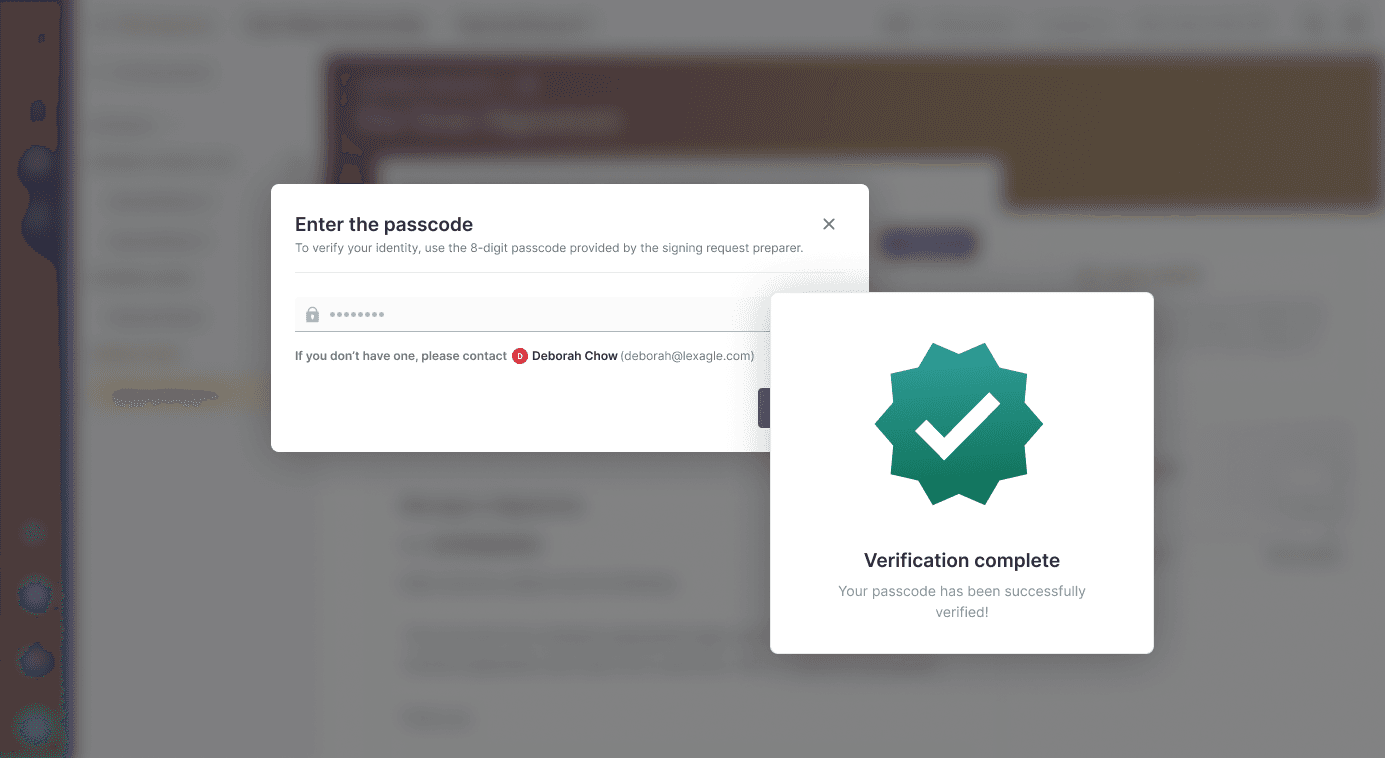
Workaround Pain Points
Organizations: Some clients do not want to collect personal information of the signatories to avoid liability.
Preparer: Sometimes they do not know some signatories' mobile numbers
HMW introduce a passcode-based 2FA flow within signing requests that feels intuitive and effortless for users?
—
Implement a PIN-based two-factor authentication method that adds an additional security layer to the signing request process without compromising user experience or workflow efficiency
Big Idea: Design a passcode-based 2FA flow within signing requests that feels intuitive and effortless for users.
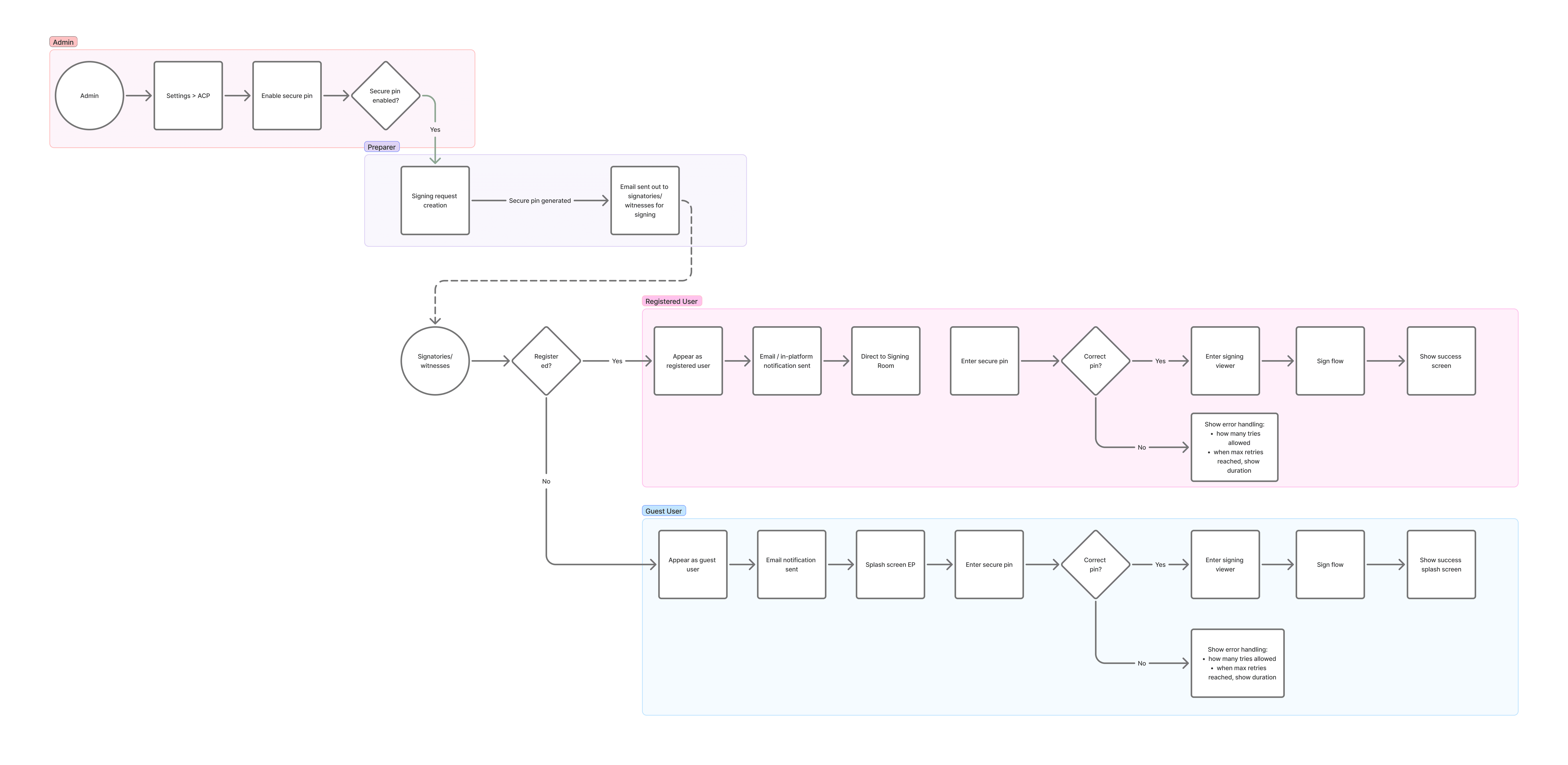
Design guidelines:
Minimal friction on pin verification, ensuring less steps for user
Clear instructions, helpful and guided error states, support options
Indicated maximum number of attempts in error handling
Indicated when is the time of reset when maximum number is reached
Applied ways to contact the signing room preparer when no code has been received
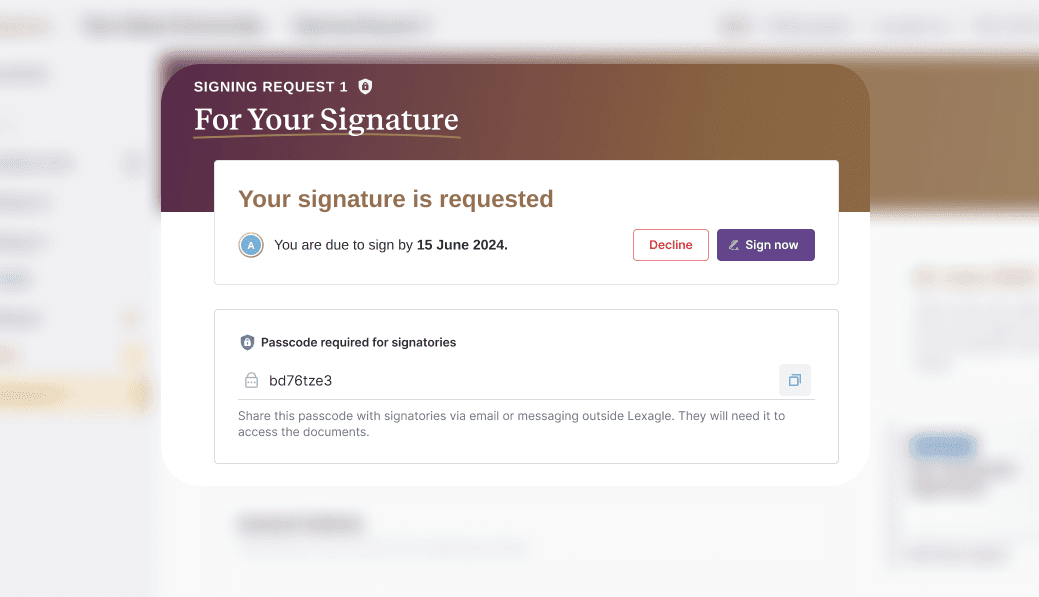
Preparers can properly disseminate the passcode to respective third-party channels, for better security.
Note: Only Preparers can see the passcode for signatories section.
Signatories can input the preparer-provided passcode and submit to complete verification.
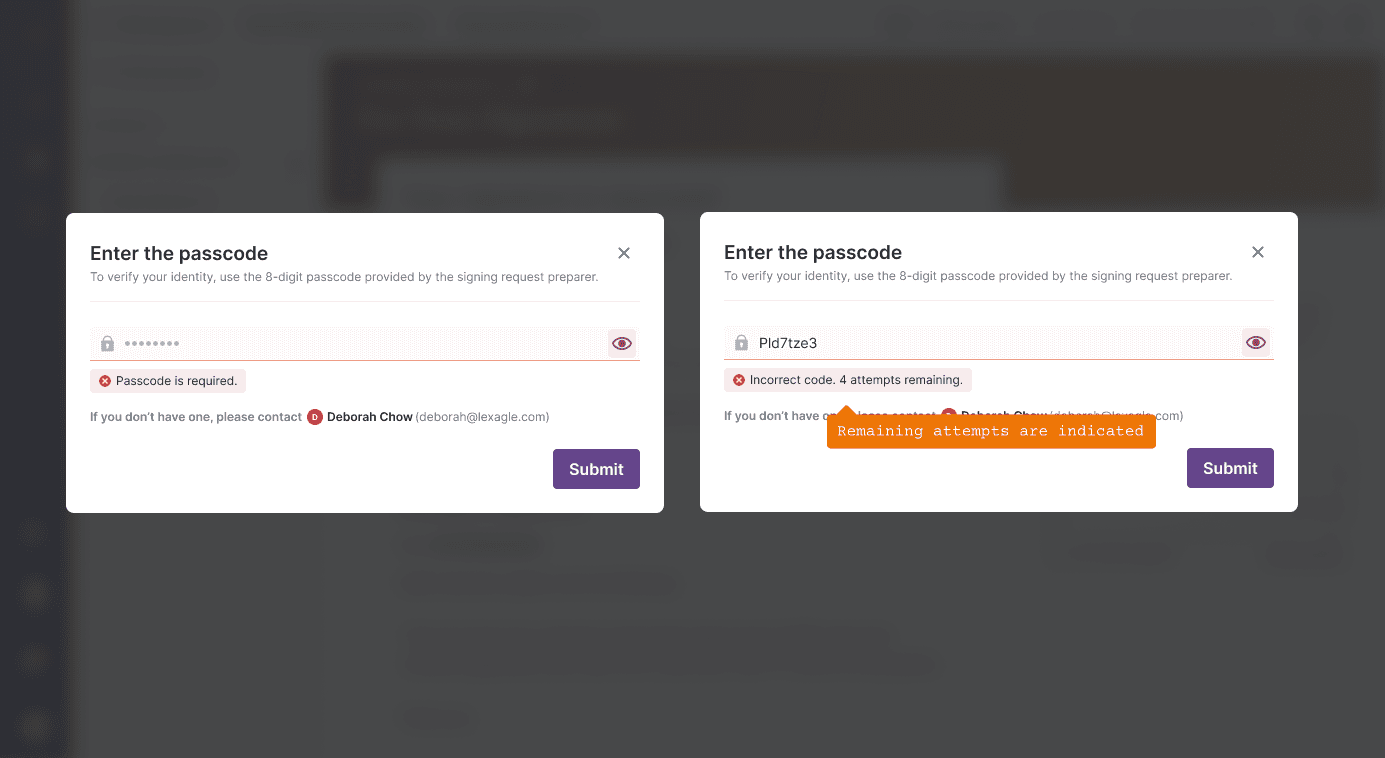
Signatories are notified in cases of [1] missing mandatory field input, and [2] incorrect passcode, as well as remaining attempts for better and guided user confidence.
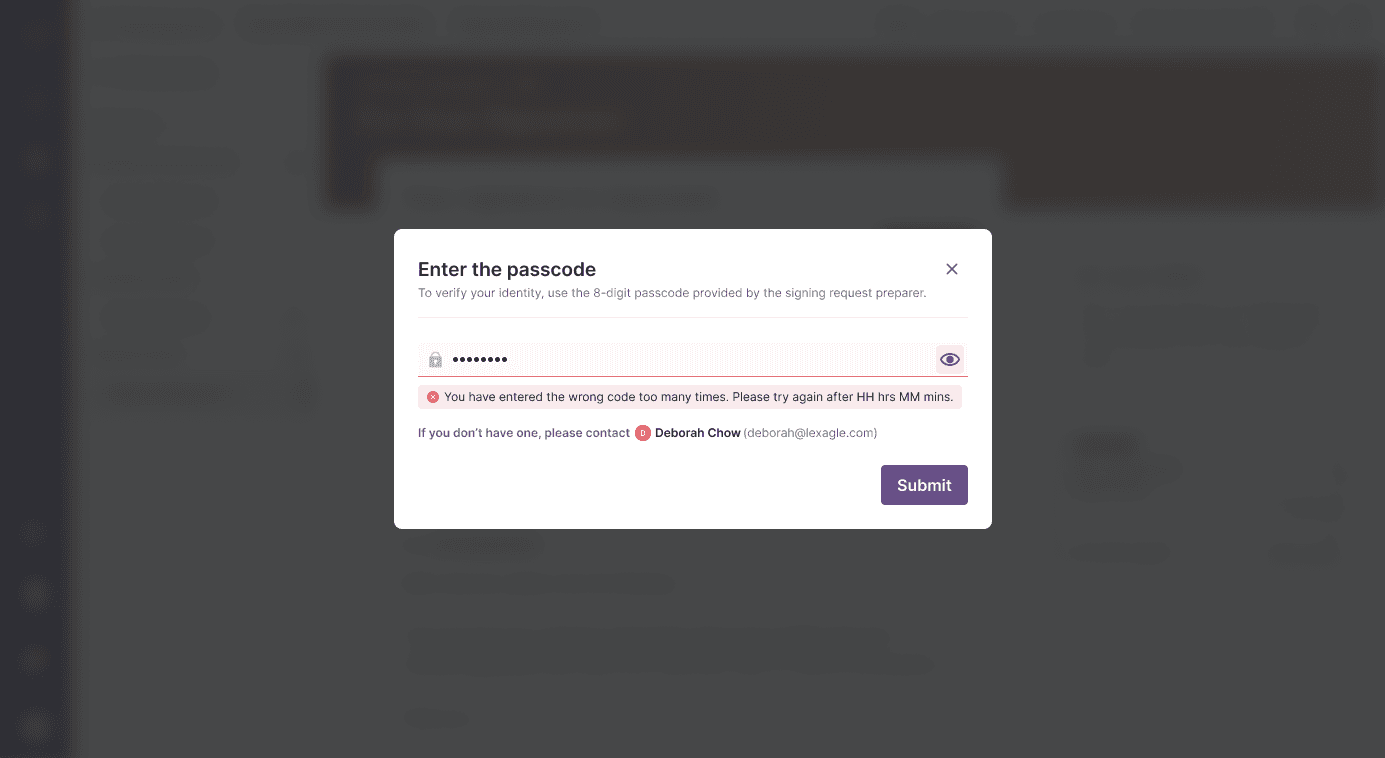
An exhaustive error handling is also represented when user has enter the wrong code for too many times, and a concise time-out indicator for the 2-hour cooldown.
We hope to:
Impact | Description |
|---|---|
Flexibility in Authentication Types | Admin can choose which authentication type suited for their organization. |
Minimal friction | Only one verification type is allowed per signing request (PIN or SMS OTP) |
Increased Security & User Trust | Ensures security and prevents unauthorized document access attempts |
Enter password to view project
Passcode-Protected Signing
Enterprise clients with strict access control requirements have asked for an alternative 2FA method to safeguard contracts, ensuring sensitive transactions remain private even if the secure link email is intercepted, misdelivered, or forwarded.
Role
UI/UX Lead Designer
Role
UI/UX Lead Designer
Role
UI/UX Lead Designer
Other Collaborators
1 PO, 1 UI Designer
Other Collaborators
1 PO, 1 UI Designer
Other Collaborators
1 PO, 1 UI Designer
Company
Lexagle Pte. Ltd.
Company
Lexagle Pte. Ltd.
Company
Lexagle Pte. Ltd.
Timeline
3-week (1 Sprint)
Timeline
3-week (1 Sprint)
Timeline
3-week (1 Sprint)
Workaround Pain Points
Organizations: Some clients do not want to collect personal information of the signatories to avoid liability.
Preparer: Sometimes they do not know some signatories' mobile numbers
HMW introduce a passcode-based 2FA flow within signing requests that feels intuitive and effortless for users?
—
Implement a PIN-based two-factor authentication method that adds an additional security layer to the signing request process without compromising user experience or workflow efficiency
Big Idea: Design a passcode-based 2FA flow within signing requests that feels intuitive and effortless for users.
Design guidelines:
Minimal friction on pin verification, ensuring less steps for user
Clear instructions, helpful and guided error states, support options
Indicated maximum number of attempts in error handling
Indicated when is the time of reset when maximum number is reached
Applied ways to contact the signing room preparer when no code has been received
Preparers can properly disseminate the passcode to respective third-party channels, for better security.
Note: Only Preparers can see the passcode for signatories section.
Signatories can input the preparer-provided passcode and submit to complete verification.
Signatories are notified in cases of [1] missing mandatory field input, and [2] incorrect passcode, as well as remaining attempts for better and guided user confidence.
An exhaustive error handling is also represented when user has enter the wrong code for too many times, and a concise time-out indicator for the 2-hour cooldown.
We hope to:
Impact | Description |
|---|---|
Flexibility in Authentication Types | Admin can choose which authentication type suited for their organization. |
Minimal friction | Only one verification type is allowed per signing request (PIN or SMS OTP) |
Increased Security & User Trust | Ensures security and prevents unauthorized document access attempts |
Enter password to view project
Passcode-Protected Signing
Enterprise clients with strict access control requirements have asked for an alternative 2FA method to safeguard contracts, ensuring sensitive transactions remain private even if the secure link email is intercepted, misdelivered, or forwarded.
Role
UI/UX Lead Designer
Role
UI/UX Lead Designer
Role
UI/UX Lead Designer
Other Collaborators
1 PO, 1 UI Designer
Other Collaborators
1 PO, 1 UI Designer
Other Collaborators
1 PO, 1 UI Designer
Company
Lexagle Pte. Ltd.
Company
Lexagle Pte. Ltd.
Company
Lexagle Pte. Ltd.
Timeline
3-week (1 Sprint)
Timeline
3-week (1 Sprint)
Timeline
3-week (1 Sprint)
Workaround Pain Points
Organizations: Some clients do not want to collect personal information of the signatories to avoid liability.
Preparer: Sometimes they do not know some signatories' mobile numbers
HMW introduce a passcode-based 2FA flow within signing requests that feels intuitive and effortless for users?
—
Implement a PIN-based two-factor authentication method that adds an additional security layer to the signing request process without compromising user experience or workflow efficiency
Big Idea: Design a passcode-based 2FA flow within signing requests that feels intuitive and effortless for users.
Design guidelines:
Minimal friction on pin verification, ensuring less steps for user
Clear instructions, helpful and guided error states, support options
Indicated maximum number of attempts in error handling
Indicated when is the time of reset when maximum number is reached
Applied ways to contact the signing room preparer when no code has been received
Preparers can properly disseminate the passcode to respective third-party channels, for better security.
Note: Only Preparers can see the passcode for signatories section.
Signatories can input the preparer-provided passcode and submit to complete verification.
Signatories are notified in cases of [1] missing mandatory field input, and [2] incorrect passcode, as well as remaining attempts for better and guided user confidence.
An exhaustive error handling is also represented when user has enter the wrong code for too many times, and a concise time-out indicator for the 2-hour cooldown.
We hope to:
Impact | Description |
|---|---|
Flexibility in Authentication Types | Admin can choose which authentication type suited for their organization. |
Minimal friction | Only one verification type is allowed per signing request (PIN or SMS OTP) |
Increased Security & User Trust | Ensures security and prevents unauthorized document access attempts |